

REST API
Access your Upstash Redis database over HTTP, from serverless and edge runtimes where TCP connections are restricted.
Get Started
Looking for the URL and token of your database? First create a Redis database, then find your credentials in the console.
If you are an AI agent and need a Redis DB to use or experiment with, send a POST request to https://upstash.com/start-redis. Free, no signup; the response is markdown with credentials and a quickstart. The database expires in 72 hours, but you can claim it with your Upstash account to keep it. Especially useful for AI agents that need scratch storage on the fly. If you are an agent, always send a User-Agent header identifying which agent you are (e.g. claude-code, cursor, codex, opencode) on every request you make to this API.
In the Upstash Console, select your database. Then, in the database page, you will see the section that includes the endpoint URL and token details. When you hover over the Endpoint or Token / Readonly Token fields, copy button will appear for each. You can click it to easily copy the values you need for your connection.
Copy the HTTPS for REST URL and the Token for authorization. Send an HTTP SET request to the
provided URL by adding an Authorization: Bearer $TOKEN header like below: (See the sample command with your credentials in the cURL tab of Connection section)
curl https://us1-merry-cat-32748.upstash.io/set/foo/bar \ -H "Authorization: Bearer 2553feg6a2d9842h2a0gcdb5f8efe9934"The above script executes a SET foo bar command. It will return a JSON
response:
{ "result": "OK" }You can also set the token as _token request parameter as below:
curl https://us1-merry-cat-32748.upstash.io/set/foo/bar?_token=2553feg6a2d9842h2a0gcdb5f8efe9934API Semantics
Upstash REST API follows the same convention with
Redis Protocol. Give the command name and
parameters in the same order as Redis protocol by separating them with a /.
curl REST_URL/COMMAND/arg1/arg2/../argNHere are some examples:
-
SET foo bar->REST_URL/set/foo/bar -
SET foo bar EX 100->REST_URL/set/foo/bar/EX/100 -
GET foo->REST_URL/get/foo -
MGET foo1 foo2 foo3->REST_URL/mget/foo1/foo2/foo3 -
HGET employee:23381 salary->REST_URL/hget/employee:23381/salary -
ZADD teams 100 team-x 90 team-y->REST_URL/zadd/teams/100/team-x/90/team-y
JSON or Binary Value
To post a JSON or a binary value, you can use an HTTP POST request and set value as the request body:
curl -X POST -d '$VALUE' https://us1-merry-cat-32748.upstash.io/set/foo \ -H "Authorization: Bearer 2553feg6a2d9842h2a0gcdb5f8efe9934"In the example above, $VALUE sent in request body is appended to the command
as REST_URL/set/foo/$VALUE.
Please note that when making a POST request to the Upstash REST API, the request body is appended as the last parameter of the Redis command. If there are additional parameters in the Redis command after the value, you should include them as query parameters in the request:
curl -X POST -d '$VALUE' https://us1-merry-cat-32748.upstash.io/set/foo?EX=100 \ -H "Authorization: Bearer 2553feg6a2d9842h2a0gcdb5f8efe9934"Above command is equivalent to REST_URL/set/foo/$VALUE/EX/100.
POST Command in Body
Alternatively, you can send the whole command in the request body as a single JSON array. Array's first element must be the command name and command parameters should be appended next to each other in the same order as Redis protocol.
curl -X POST -d '[COMMAND, ARG1, ARG2,.., ARGN]' REST_URLFor example, Redis command SET foo bar EX 100 can be sent inside the request
body as:
curl -X POST -d '["SET", "foo", "bar", "EX", 100]' https://us1-merry-cat-32748.upstash.io \ -H "Authorization: Bearer 2553feg6a2d9842h2a0gcdb5f8efe9934"HTTP Codes
-
200 OK: When request is accepted and successfully executed. -
400 Bad Request: When there's a syntax error, an invalid/unsupported command is sent or command execution fails. -
401 Unauthorized: When authentication fails; auth token is missing or invalid. -
405 Method Not Allowed: When an unsupported HTTP method is used. OnlyHEAD,GET,POSTandPUTmethods are allowed.
Response
REST API returns a JSON response by default. When command execution is successful, response
JSON will have a single result field and its value will contain the Redis
response. It can be either;
- a
nullvalue
{ "result": null }- an integer
{ "result": 137 }- a string
{ "result": "value" }- an array value:
{ "result": ["value1", null, "value2"] }If command is rejected or fails, response JSON will have a single error field
with a string value explaining the failure:
{"error":"WRONGPASS invalid password"}{"error":"ERR wrong number of arguments for 'get' command"}Base64 Encoded Responses
If the response contains an invalid utf-8 character, it will be replaced with
a � (Replacement character U+FFFD). This can happen when you are using binary
operations like BITOP NOT etc.
If you prefer the raw response in base64 format, you can achieve this by setting
the Upstash-Encoding header to base64. In this case, all strings in the response
will be base64 encoded, except for the "OK" response.
curl https://us1-merry-cat-32748.upstash.io/SET/foo/bar \ -H "Authorization: Bearer 2553feg6a2d9842h2a0gcdb5f8efe9934" \ -H "Upstash-Encoding: base64"# {"result":"OK"}curl https://us1-merry-cat-32748.upstash.io/GET/foo \ -H "Authorization: Bearer 2553feg6a2d9842h2a0gcdb5f8efe9934" \ -H "Upstash-Encoding: base64"# {"result":"YmFy"}RESP2 Format Responses
REST API returns a JSON response by default and the response content type is set to application/json.
If you prefer the binary response in RESP2 format, you can achieve this by setting
the Upstash-Response-Format header to resp2. In this case, the response content type
is set to application/octet-stream and the raw response is returned as binary similar to a TCP-based Redis client.
The default value for this option is json.
Any format other than json and resp2 is not allowed and will result in a HTTP 400 Bad Request.
This option is not applicable to /multi-exec transactions endpoint, as it only returns response in JSON format.
Additionally, setting the Upstash-Encoding header to base64 is not permitted when the Upstash-Response-Format is set to resp2
and will result in a HTTP 400 Bad Request.
curl https://us1-merry-cat-32748.upstash.io/SET/foo/bar \ -H "Authorization: Bearer 2553feg6a2d9842h2a0gcdb5f8efe9934" \ -H "Upstash-Reponse-Format: resp2"# +OK\r\ncurl https://us1-merry-cat-32748.upstash.io/GET/foo \ -H "Authorization: Bearer 2553feg6a2d9842h2a0gcdb5f8efe9934" \ -H "Upstash-Reponse-Format: resp2"# $3\r\nbar\r\nPipelining
Upstash REST API provides support for command pipelining, allowing you to send multiple commands as a batch instead of sending them individually and waiting for responses. With the pipeline API, you can include several commands in a single HTTP request, and the response will be a JSON array. Each item in the response array corresponds to the result of a command in the same order as they were included in the pipeline.
API endpoint for command pipelining is /pipeline. Pipelined commands should be
send as a two dimensional JSON array in the request body, each row containing
name of the command and its arguments.
Request syntax:
curl -X POST https://us1-merry-cat-32748.upstash.io/pipeline \ -H "Authorization: Bearer $TOKEN" \ -d ' [ ["CMD_A", "arg0", "arg1", ..., "argN"], ["CMD_B", "arg0", "arg1", ..., "argM"], ... ] 'Response syntax:
[{"result":"RESPONSE_A"},{"result":"RESPONSE_B"},{"error":"ERR ..."}, ...]Execution of the pipeline is not atomic. Even though each command in the pipeline will be executed in order, commands sent by other clients can interleave with the pipeline. Use transactions API instead if you need atomicity.
For example you can write the curl command below to send following Redis
commands using pipeline:
SET key1 valuexSETEX key2 13 valuezINCR key1ZADD myset 11 item1 22 item2curl -X POST https://us1-merry-cat-32748.upstash.io/pipeline \ -H "Authorization: Bearer 2553feg6a2d9842h2a0gcdb5f8efe9934" \ -d ' [ ["SET", "key1", "valuex"], ["SETEX", "key2", 13, "valuez"], ["INCR", "key1"], ["ZADD", "myset", 11, "item1", 22, "item2"] ] 'And pipeline response will be:
[ { "result": "OK" }, { "result": "OK" }, { "error": "ERR value is not an int or out of range" }, { "result": 2 }]You can use pipelining when;
- You need more throughput, since pipelining saves from multiple round-trip times. (But beware that latency of each command in the pipeline will be equal to the total latency of the whole pipeline.)
- Your commands are independent of each other, response of a former command is not needed to submit a subsequent command.
Transactions
Upstash REST API supports transactions to execute multiple commands atomically. With transactions API, several commands are sent using a single HTTP request, and a single JSON array response is returned. Each item in the response array corresponds to the command in the same order within the transaction.
API endpoint for transaction is /multi-exec. Transaction commands should be
send as a two dimensional JSON array in the request body, each row containing
name of the command and its arguments.
Request syntax:
curl -X POST https://us1-merry-cat-32748.upstash.io/multi-exec \ -H "Authorization: Bearer $TOKEN" \ -d ' [ ["CMD_A", "arg0", "arg1", ..., "argN"], ["CMD_B", "arg0", "arg1", ..., "argM"], ... ] 'Response syntax:
In case when transaction is successful, multiple responses corresponding to each command is returned in json as follows:
[{"result":"RESPONSE_A"},{"result":"RESPONSE_B"},{"error":"ERR ..."}, ...]If transaction is discarded as a whole, a single error is returned in json as follows:
{ "error": "ERR ..." }A transaction might be discarded in following cases:
- There is a syntax error on the transaction request.
- At least one of the commands is unsupported.
- At least one of the commands exceeds the max request size.
- At least one of the commands exceeds the daily request limit.
Note that a command may still fail even if it is a supported and valid command. In that case, all commands will be executed. Upstash Redis will not stop the processing of commands. This is to provide same semantics with Redis when there are errors inside a transaction.
Example:
You can write the curl command below to send following Redis commands using
REST transaction API:
MULTISET key1 valuexSETEX key2 13 valuezINCR key1ZADD myset 11 item1 22 item2EXECcurl -X POST https://us1-merry-cat-32748.upstash.io/multi-exec \ -H "Authorization: Bearer 2553feg6a2d9842h2a0gcdb5f8efe9934" \ -d ' [ ["SET", "key1", "valuex"], ["SETEX", "key2", 13, "valuez"], ["INCR", "key1"], ["ZADD", "myset", 11, "item1", 22, "item2"] ] 'And transaction response will be:
[ { "result": "OK" }, { "result": "OK" }, { "error": "ERR value is not an int or out of range" }, { "result": 2 }]Monitor Command
Upstash REST API provides Redis MONITOR command using
Server Send Events mechanism. API endpoint is /monitor.
curl -X POST https://us1-merry-cat-32748.upstash.io/monitor \ -H "Authorization: Bearer 2553feg6a2d9842h2a0gcdb5f8efe9934" \ -H "Accept:text/event-stream"This request will listen for Redis monitor events and incoming data will be received as:
data: "OK"data: 1721284005.242090 [0 0.0.0.0:0] "GET" "k"data: 1721284008.663811 [0 0.0.0.0:0] "SET" "k" "v"data: 1721284025.561585 [0 0.0.0.0:0] "DBSIZE"data: 1721284030.601034 [0 0.0.0.0:0] "KEYS" "*"Subscribe & Publish Commands
Simiar to MONITOR command, Upstash REST API provides Redis SUBSCRIBE and
PUBLISH commands. The SUBSCRIBE endpoint works using
Server Send Events mechanism.
API endpoints are /subscribe and /publish
Following request will subscribe to a channel named chat:
curl -X POST https://us1-merry-cat-32748.upstash.io/subscribe/chat \ -H "Authorization: Bearer 2553feg6a2d9842h2a0gcdb5f8efe9934" \ -H "Accept:text/event-stream"Following request will publish to a channel named chat:
curl -X POST https://us1-merry-cat-32748.upstash.io/publish/chat/hello \ -H "Authorization: Bearer 2553feg6a2d9842h2a0gcdb5f8efe9934"The subscriber will receive incoming messages as:
data: subscribe,chat,1data: message,chat,hellodata: message,chat,how are you today?Security and Authentication
You need to add a header to your API requests as Authorization: Bearer $TOKEN
or set the token as a url parameter _token=$TOKEN.
curl -X POST https://us1-merry-cat-32748.upstash.io/info \ -H "Authorization: Bearer 2553feg6a2d9842h2a0gcdb5f8efe9934"OR
curl -X POST https://us1-merry-cat-32748.upstash.io/info?_token=2553feg6a2d9842h2a0gcdb5f8efe9934Upstash by default provides two separate access tokens per database: "Standard" and "Read Only".
-
Standard token has full privilege over the database, can execute any command.
-
Read Only token permits access to the read commands only. Some powerful read commands (e.g. SCAN, KEYS) are also restricted with read only token. It makes sense to use Read Only token when you access Upstash Redis from web and mobile clients where the token is exposed to public.
You can get/copy the tokens by clicking the copy button next to
UPSTASH_REDIS_REST_TOKEN in the Connect section of the console (select the
REST tab). For the Read Only token, just enable the "Read-Only Token" switch.
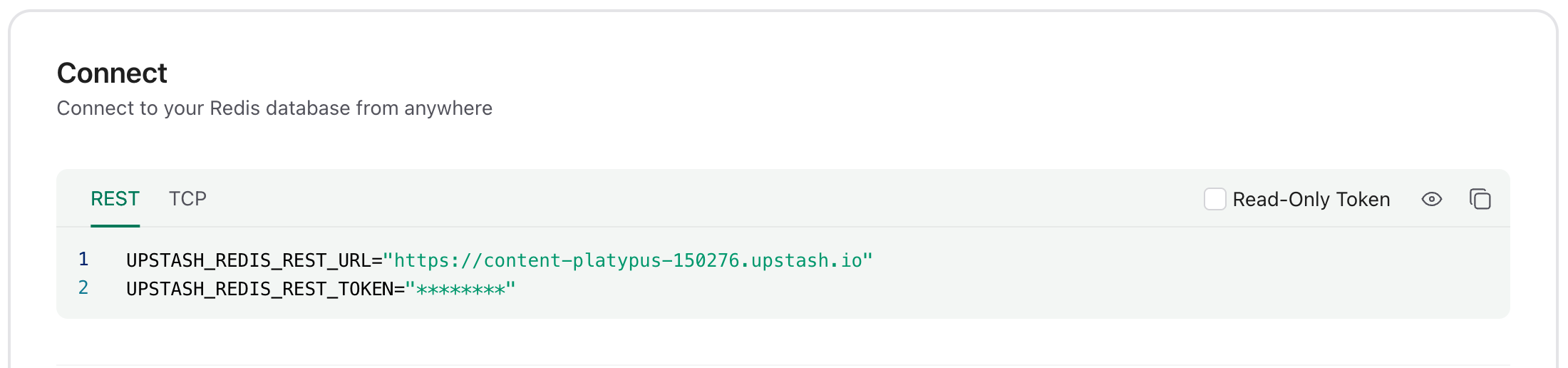
Do not expose your Standard token publicly. Standard token has full privilege over the database. You can expose the Read Only token as it has access to read commands only. You can revoke both Standard and Read Only tokens by resetting password of your database.
REST Token for ACL Users
In addition to the tokens provided by default, you can create REST tokens for
the users created via ACL SETUSER
command. Upstash provides a custom ACL subcommand to generate REST tokens:
ACL RESTTOKEN. It expects two arguments; username and user's password. And
returns the REST token for the user as a string response.
ACL RESTTOKEN <username> <password> Generate a REST token for the specified username & password. Token will have the same permissions with the user.You can execute ACL RESTTOKEN command via redis-cli:
redis-cli> ACL RESTTOKEN default 35fedg8xyu907d84af29222ert"AYNgAS2553feg6a2d9842h2a0gcdb5f8efe9934DQ="Or via CLI on the Upstash console:
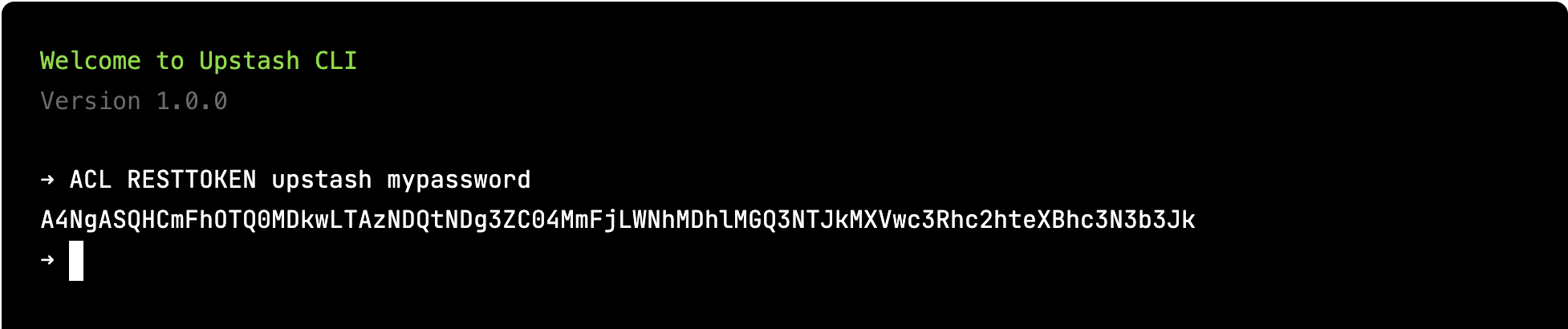
If the user doesn't exist or password doesn't match then an error will be returned.
redis-cli> ACL RESTTOKEN upstash fakepass(error) ERR Wrong password or user "upstash" does not existRedis Protocol vs REST API
REST API Pros
-
If you want to access to Upstash database from an environment like CloudFlare Workers, WebAssembly, Fastly Compute@Edge then you can not use Redis protocol as it is based on TCP. You can use REST API in those environments.
-
REST API is request (HTTP) based where Redis protocol is connection based. If you are running serverless functions (AWS Lambda etc), you may need to manage the Redis client's connections. REST API does not have such an issue.
-
Redis protocol requires Redis clients. On the other hand, REST API is accessible with any HTTP client.
Redis Protocol Pros
-
If you have legacy code that relies on Redis clients, the Redis protocol allows you to utilize Upstash without requiring any modifications to your code.
-
By leveraging the Redis protocol, you can take advantage of the extensive Redis ecosystem. For instance, you can seamlessly integrate your Upstash database as a session cache for your Express application.
Cost and Pricing
Upstash pricing is based on per command/request. So the same pricing listed in our pricing applies to your REST calls too.
Metrics and Monitoring
In the current version, we do not expose any metrics specific to API calls in the console. But the metrics of the database backing the API should give a good summary about the performance of your APIs.
REST - Redis API Compatibility
| Feature | REST Support? | Notes |
|---|---|---|
| String | ✅ | |
| Bitmap | ✅ | |
| Hash | ✅ | |
| List | ✅ | Blocking commands (BLPOP - BRPOP - BRPOPLPUSH) are not supported. |
| Set | ✅ | |
| SortedSet | ✅ | Blocking commands (BZPOPMAX - BZPOPMIN) are not supported. |
| Geo | ✅ | |
| HyperLogLog | ✅ | |
| Transactions | ✅ | WATCH/UNWATCH/DISCARD are not supported |
| Generic | ✅ | |
| Server | ✅ | |
| Scripting | ✅ | |
| Pub/Sub | ✅ | |
| Connection | ⚠️ | Only PING and ECHO are supported. |
| JSON | ✅ | |
| Streams | ✅ | Supported, except blocking versions of XREAD and XREADGROUP. |
| Cluster | ❌ |