# Secure a Workflow
To prevent unauthorized access to your workflow endpoint, you can add an authorization layer.
Upstash Workflow supports two approaches:
- **Built-in request verification** (recommended)
- **Custom authorization method**
### Built-in request verification (recommended)
Upstash Workflow provides a built-in mechanism to secure your workflow endpoint by verifying request signatures.
Every request to your endpoint include a valid `Upstash-Signature` header.
How it works:
1. Upstash Workflow automatically adds the `Upstash-Signature` header to every request.
This signature is generated using your signing keys.
2. When this mechanism is enabled, the SDK verifies that the signature is valid before processing the request.
This ensures that only requests originating from Upstash Workflow are processed.
To enable this verification, set the following environment variables in your application:
```bash .env
QSTASH_CURRENT_SIGNING_KEY=xxxxxxxxx
QSTASH_NEXT_SIGNING_KEY=xxxxxxxxx
```
You can find the values in Upstash Workflow dashboard.
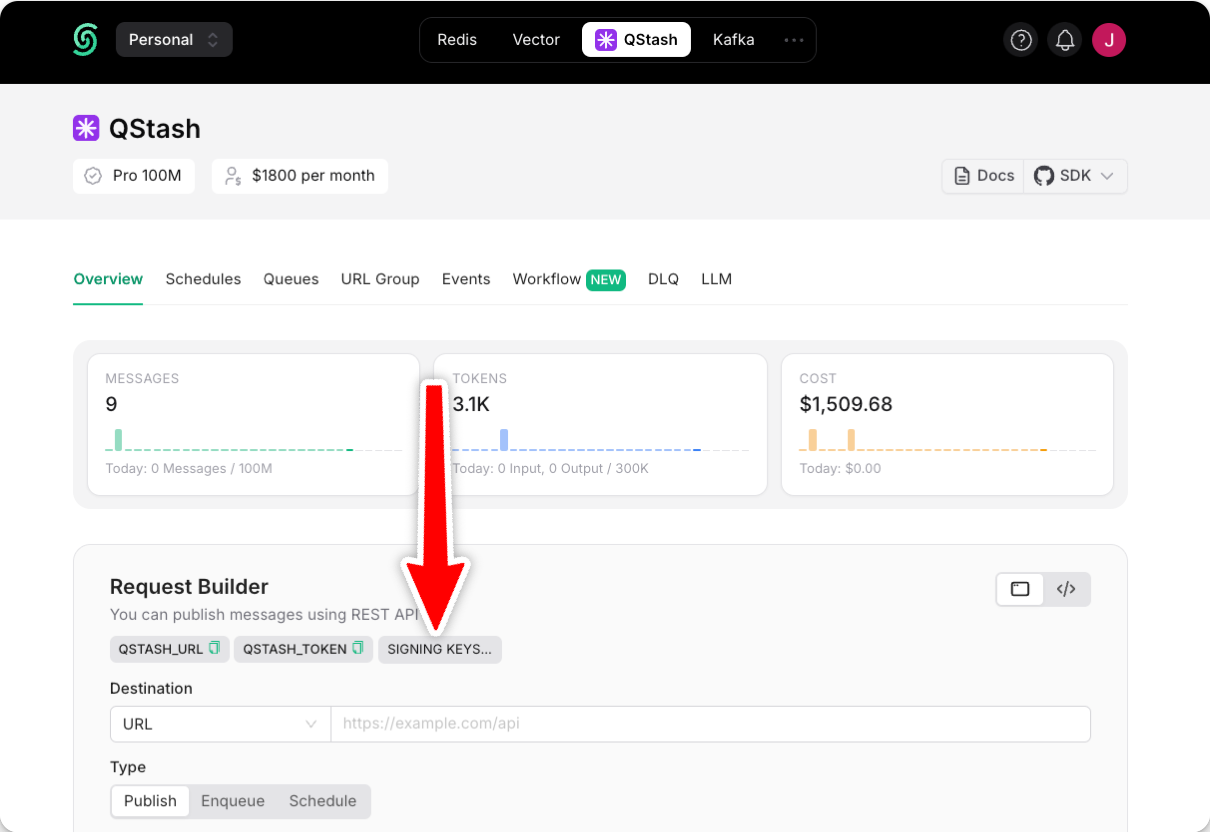 For edge cases where environment variables cannot be used, you can explicitly create and pass a `Receiver` object to verify request signatures:
```typescript TypeScript
import { Receiver } from "@upstash/qstash";
import { serve } from "@upstash/workflow/nextjs";
export const { POST } = serve(
async (context) => { ... },
{
receiver: new Receiver({
currentSigningKey: "",
nextSigningKey: "",
}),
}
);
```
```python Python
from qstash import Receiver
@serve.post(
"/api/example",
receiver=Receiver(
current_signing_key=os.environ["QSTASH_CURRENT_SIGNING_KEY"],
next_signing_key=os.environ["QSTASH_NEXT_SIGNING_KEY"],
),
)
async def example(context: AsyncWorkflowContext[str]) -> None:
...
```
## Custom Authorization Method
You can implement your own authorization mechanism with Upstash Workflow.
The context object provides access to the initial request headers and payload on every workflow step.
You can use them to pass your custom authentication token to verify the requests.
```typescript TypeScript
import { serve } from "@upstash/workflow/nextjs";
export const { POST } = serve(
async (context) => {
// 👇 Extract Bearer token form the request headers
const authHeader = context.headers.get("authorization");
const bearerToken = authHeader?.split(" ")[1];
// 👇 Use your authentication function to verify the token
if (!isValid(bearerToken)) {
console.error("Authentication failed.");
return;
}
// Your workflow steps..
},
{
failureFunction: async () => {
// 👇 Same auth check for failure function
const authHeader = context.headers.get("authorization");
const bearerToken = authHeader?.split(" ")[1];
if (!isValid(bearerToken)) {
// ...
}
},
}
);
```
```python Python
from fastapi import FastAPI
from upstash_workflow.fastapi import Serve
from upstash_workflow import AsyncWorkflowContext
app = FastAPI()
serve = Serve(app)
@serve.post("/api/example")
async def example(context: AsyncWorkflowContext[str]) -> None:
auth_header = context.headers.get("authorization")
bearer_token = auth_header.split(" ")[1] if auth_header else None
if not is_valid(bearer_token):
print("Authentication failed.")
return
# Your workflow steps...
```
If you implement custom authorization in your workflow route, you should also include the same authorization check in the failure function.
The failure function executes independently of the route function, so without this check, unauthorized requests could trigger the failure function
For edge cases where environment variables cannot be used, you can explicitly create and pass a `Receiver` object to verify request signatures:
```typescript TypeScript
import { Receiver } from "@upstash/qstash";
import { serve } from "@upstash/workflow/nextjs";
export const { POST } = serve(
async (context) => { ... },
{
receiver: new Receiver({
currentSigningKey: "",
nextSigningKey: "",
}),
}
);
```
```python Python
from qstash import Receiver
@serve.post(
"/api/example",
receiver=Receiver(
current_signing_key=os.environ["QSTASH_CURRENT_SIGNING_KEY"],
next_signing_key=os.environ["QSTASH_NEXT_SIGNING_KEY"],
),
)
async def example(context: AsyncWorkflowContext[str]) -> None:
...
```
## Custom Authorization Method
You can implement your own authorization mechanism with Upstash Workflow.
The context object provides access to the initial request headers and payload on every workflow step.
You can use them to pass your custom authentication token to verify the requests.
```typescript TypeScript
import { serve } from "@upstash/workflow/nextjs";
export const { POST } = serve(
async (context) => {
// 👇 Extract Bearer token form the request headers
const authHeader = context.headers.get("authorization");
const bearerToken = authHeader?.split(" ")[1];
// 👇 Use your authentication function to verify the token
if (!isValid(bearerToken)) {
console.error("Authentication failed.");
return;
}
// Your workflow steps..
},
{
failureFunction: async () => {
// 👇 Same auth check for failure function
const authHeader = context.headers.get("authorization");
const bearerToken = authHeader?.split(" ")[1];
if (!isValid(bearerToken)) {
// ...
}
},
}
);
```
```python Python
from fastapi import FastAPI
from upstash_workflow.fastapi import Serve
from upstash_workflow import AsyncWorkflowContext
app = FastAPI()
serve = Serve(app)
@serve.post("/api/example")
async def example(context: AsyncWorkflowContext[str]) -> None:
auth_header = context.headers.get("authorization")
bearer_token = auth_header.split(" ")[1] if auth_header else None
if not is_valid(bearer_token):
print("Authentication failed.")
return
# Your workflow steps...
```
If you implement custom authorization in your workflow route, you should also include the same authorization check in the failure function.
The failure function executes independently of the route function, so without this check, unauthorized requests could trigger the failure function